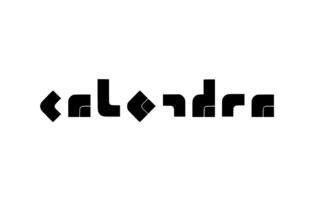
Calendra: The Display Font That Makes First Impressions Feel Intentional
Calendra isn’t just another stylish font—it’s a confident visual handshake. Designed as a display typeface, it carries a modern and smart feel without leaning into cold minimalism or playful gimmicks. Its clean lines, balanced proportions, and subtle personality make it instantly recognizable yet effortlessly versatile. If you’ve ever spent minutes scrolling through font libraries looking for something that feels both fresh and trustworthy—something that says “I mean business, but I also care about how it looks”—you’ve probably paused on Calendra.
Where Calendra Fits Naturally (and Where It Doesn’t)
Display fonts like Calendra shine when attention matters most—and they’re meant to be seen, not scanned. Think of them as the bold speaker in a room full of quiet voices: effective only when given space to breathe. That means Calendra thrives in contexts where hierarchy is clear and scale is generous.
- Branding & Identity Systems: Logo treatments, wordmarks, and monogram lockups benefit from Calendra’s strong letterforms and consistent rhythm. A wellness studio named “Aura” might use Calendra for its logotype—clean enough to signal professionalism, warm enough to avoid clinical sterility.
- Digital Landing Pages: Hero sections, headline banners, and feature callouts gain instant polish with Calendra. Paired with a neutral sans-serif body font (like Inter or Manrope), it creates contrast that guides the eye without overwhelming.
- Editorial Design: Magazine covers, newsletter headers, and podcast episode titles use Calendra to set tone before a single word is read. Its smart aesthetic signals thoughtful curation—ideal for culture newsletters, design blogs, or independent publishing projects.
- Print Collateral: Event posters, exhibition signage, and boutique packaging lean into Calendra’s presence. On thick matte paper or foil-stamped surfaces, its sharp terminals and open counters hold up beautifully at large sizes.
It’s less suited for long-form reading—no surprise there. Calendra wasn’t built for paragraphs or dense UI labels. Trying to force it into body text, navigation menus, or mobile buttons often backfires: legibility drops, loading times increase (especially with variable versions), and the intended impact gets diluted. Respect its role. Let it lead—not follow.
Who Gets the Most Out of Calendra?
Different users tap into Calendra for different reasons—and that’s where its practical value becomes clear.
Creative professionals (freelance designers, art directors, branding consultants) appreciate how quickly Calendra elevates mood boards or client presentations. It doesn’t require heavy customization to feel intentional. A few well-placed words in Calendra can shift the entire perception of a concept—making proposals feel more resolved and polished, even in early stages.
Small business owners running lifestyle brands—think ceramic studios, independent bookshops, natural skincare lines—find Calendra bridges the gap between approachable and elevated. It avoids the overused friendliness of rounded sans-serifs while staying far from the intimidating austerity of high-contrast serifs. For someone updating their Instagram highlights or redesigning a product label, Calendra offers an immediate upgrade path with low learning curve.
Developers and product teams integrating typography into web apps or SaaS dashboards sometimes reach for Calendra when designing empty states, onboarding modals, or marketing pages. Its strong x-height and open apertures ensure clarity even at smaller display sizes (32–48px), and its relatively compact width keeps headlines tight without sacrificing impact.
Practical Considerations Before You Use It
Using Calendra well means paying attention to context—not just aesthetics.
- Licensing matters: Calendra is available through several reputable foundries, but licensing varies. Some versions include web font kits with auto-hosting; others require self-hosting and careful font-display strategy. Always verify usage rights for your platform—especially if embedding in email templates or native mobile apps.
- Pairing is non-negotiable: Calendra sings when paired with a complementary text face. Avoid other display fonts or decorative scripts nearby—they compete instead of support. Stick with humanist or geometric sans-serifs for body copy, and consider testing line heights carefully: Calendra’s tall ascenders may need extra breathing room above.
- Weight choices affect tone: Calendra typically ships in 3–5 weights (Light, Regular, Medium, Bold, ExtraBold). The Regular weight works beautifully for logos and medium-size headlines. Save Bold and ExtraBold for hero text or short quotes—overuse dulls its distinctiveness. Light can feel elegant in luxury contexts but risks fading on lower-resolution screens.
- Accessibility isn’t automatic: While Calendra meets basic contrast requirements at larger sizes, always test against WCAG guidelines—especially for color combinations. Avoid light gray text on white backgrounds, even with Calendra’s clean forms. And never rely solely on font weight or style to convey meaning (e.g., using italic Calendra for emphasis instead of semantic tags).
Strengths You’ll Notice Right Away
What makes Calendra feel “smart” isn’t just its design—it’s how it behaves in real projects. Its letter spacing is thoughtfully tuned out of the box, so you rarely need aggressive tracking adjustments. Uppercase settings hold authority without stiffness; lowercase settings retain warmth and readability. Kerning pairs like “AV”, “To”, and “Wa” are refined, reducing awkward gaps that distract the eye.
It scales predictably. Whether rendered at 48px on a desktop banner or 64px on a trade show backdrop, Calendra maintains its character. No wobbling stems, no collapsed counters—just consistent presence. That reliability saves time during revisions and builds confidence in client-facing work.
A Few Realistic Limitations to Keep in Mind
No font solves every problem—and Calendra’s strengths come with natural boundaries. It doesn’t offer extensive language support out of the box (Latin-only in most releases), so global brands with multilingual audiences may need supplemental fonts or custom extensions. It also lacks true italics in many versions—optical slants or obliques are common substitutes, which work fine for headlines but won’t satisfy typographers needing nuanced cursive forms.
And while Calendra feels contemporary now, its clean-but-characterful vibe means it won’t age into “vintage cool” the way some mid-century fonts have. It’s designed to feel current, not nostalgic—so plan for eventual refresh cycles if you’re building long-term brand systems.
Try It Where You’d Normally Hesitate to Stand Out
Here’s a simple experiment: open your latest project file—whether it’s a pitch deck, Shopify homepage, or Canva social post—and swap your current headline font for Calendra at the same size. Don’t adjust tracking. Don’t change colors. Just look.
Does it feel more considered? More anchored? Does it make the rest of the layout feel quieter—or sharper—by comparison? That’s Calendra doing what it does best: turning visual decisions into emotional ones, quietly and confidently.