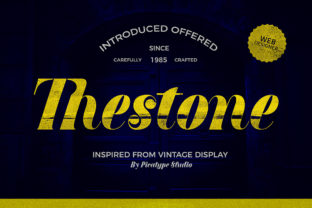
Thestone: A Bold Retro Font That Anchors Design With Authenticity
Typography isn’t just about legibility—it’s about tone, timing, and trust. When you choose Thestone, you’re not selecting a font; you’re aligning your visual language with a specific kind of confidence: grounded, unapologetic, and quietly confident. Designed with deliberate weight, uneven stroke contrast, and subtle irregularities that echo hand-set metal type, Thestone carries authenticity in its curves and corners. It doesn’t try to be neutral. It doesn’t fade into the background. Instead, it holds space—firmly, memorably, and with intention.
Where Thestone Fits in Your Design Process
Most designers reach for display fonts at the end of a project—after layout, color, imagery, and messaging are locked in. But Thestone works best when introduced earlier—not as decoration, but as a structural signal. Its presence shapes decisions: how much white space feels right, how bold supporting text should be, whether a headline needs extra breathing room or tighter tracking. Because Thestone commands attention without shouting, it encourages restraint elsewhere. That makes it especially valuable during the refinement phase, where clarity and hierarchy are refined, not invented.
For marketers building campaign assets, Thestone often lands in mood boards before copy is finalized. Its retro sensibility helps teams quickly assess whether a concept leans nostalgic, artisanal, or rebellious—without needing full mockups. Educators designing workshop handouts use it for section headers to create immediate visual rhythm, helping learners parse information faster. Freelancers building brand identities test Thestone alongside serif body fonts (like Merriweather or EB Garamond) to gauge contrast balance early—saving hours of late-stage revisions.
Practical Integration Across Tools and Workflows
Thestone is available in OTF and WOFF2 formats, making it compatible with Figma, Adobe Creative Cloud, Webflow, Squarespace, and most modern CMS platforms. In Figma, designers often save Thestone as a local variable in their typography library—paired with a system font fallback (e.g., “Thestone”, -apple-system, BlinkMacSystemFont, sans-serif) for prototyping. That way, it renders accurately in design files while remaining web-safe in final builds.
In WordPress or Shopify themes, embedding Thestone requires only two steps: uploading the WOFF2 file to the theme’s assets folder and adding a @font-face rule in the custom CSS panel. No plugins needed. For teams using Google Fonts, note that Thestone isn’t hosted there—so self-hosting ensures consistency and avoids third-party loading delays. That small setup step pays off in reliability: no FOIT (flash of invisible text), no layout shifts, and full control over weight variants (Regular, Bold, and Condensed are standard).
When used in print workflows—think business cards, posters, or packaging—Thestone’s high x-height and open counters improve readability at small sizes. Test it at 14–16pt in body copy only if paired with generous line height (1.6+). More often, it shines at 24pt and up. Print providers appreciate its clean vector outlines and lack of thin hairlines, which eliminates trapping issues during CMYK conversion.
Using Thestone Before, During, and After Key Milestones
Before a launch: Use Thestone in internal pitch decks—not for every slide, but for core value statements and taglines. Its distinct voice primes stakeholders to interpret messaging as intentional and differentiated, not generic. You’ll notice fewer requests for “make it pop more” because Thestone already does.
During content creation: Writers and editors often draft headlines in Thestone first—even if the final site uses a different font. Why? Because its rhythm forces concision. A phrase that looks awkward or cramped in Thestone usually needs rewording anyway. It becomes a silent editor.
After delivery: Clients remember Thestone. Not by name, but by feel. When they return for updates or expansions, they’ll say things like, “Keep that strong, classic look,” or “That title font made our product feel trustworthy.” That’s social proof built into typography—not marketing spin.
Compatibility and Real-World Constraints
Thestone pairs well with humanist sans-serifs (like Inter or Nunito) and low-contrast serifs (such as Lora or Source Serif Pro). Avoid pairing it with geometric sans-serifs (e.g., Montserrat or Poppins) unless aiming for deliberate tension—their precision clashes with Thestone’s organic warmth. Also avoid stacking multiple display fonts on one page; Thestone is strongest when it’s the sole voice of personality.
Accessibility matters: its bold weight meets WCAG AA contrast standards at 18pt+ on light backgrounds. For dark mode interfaces, use Thestone at 20pt minimum with a light gray (#e0e0e0) rather than pure white to reduce glare. And while it supports Latin, Greek, and Cyrillic characters, check glyph coverage if targeting multilingual audiences—some diacritics require manual adjustment in OpenType-aware editors.
Long-Term Use: Consistency Without Fatigue
Fonts wear out when overused—not technically, but perceptually. Thestone avoids fatigue through intelligent limitation. Think of it as a signature ingredient, not a base note. One team of podcasters uses it exclusively for episode titles and show logos, switching to a clean sans-serif for timestamps, guest names, and descriptions. Another small publisher reserves Thestone for cover lines and chapter openers, keeping body text in a highly readable serif. Both approaches preserve impact across dozens of iterations.
For brand systems, define clear usage rules early: “Thestone is for primary headlines only. Never in navigation, buttons, or data tables.” Document those rules in your style guide—not as restrictions, but as guardrails for coherence. Teams that treat Thestone as a strategic asset, not a decorative flourish, report higher internal alignment and faster client approvals.
Workflow Tips You Can Apply Today
- Start with hierarchy, not aesthetics: Draft your content outline first, then assign Thestone only to H1s and key callout boxes—not every heading level.
- Test legibility early: Paste a paragraph set in Thestone into your actual layout tool at 24pt and zoom out to 50%. If word shapes blur or letters merge, adjust letter spacing (+20–40 units in Figma or CSS).
- Batch export for cross-platform use: Generate WOFF2 for web, OTF for desktop apps, and SVG versions for icon-based applications (e.g., social avatars or app store badges).
- Use it to audit existing work: Open an old project and temporarily swap in Thestone for all headlines. Does the layout still hold? If not, the underlying structure needs refinement—not the font.
- Track usage frequency: In shared design systems, log where and how often Thestone appears. Overuse in secondary UI elements (like tooltips or form labels) dilutes its authority.
Thestone doesn’t ask you to change your process—it asks you to clarify it. Its bold retro character works because it refuses ambiguity. That same clarity transfers to your workflow: fewer rounds of revision, stronger stakeholder buy-in, and designs that land with purpose instead of hoping to be noticed. It’s not about making things look older. It’s about making them feel more certain.
When you choose Thestone, you’re choosing a voice with history—and giving your work permission to speak with equal conviction.