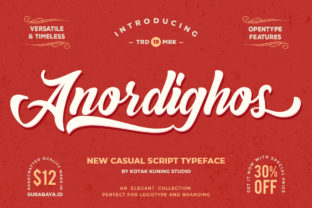
Anordighos: A Casual Display Font That Fits Real Workflows
Typography isn’t just about aesthetics—it’s part of how information lands, how tone is set, and how quickly a message connects. Anordighos stands out because it bridges personality and practicality: a casual and playful display font with a personal twist, yet built for clarity and readability. It’s not meant for body text or long-form reading, but for moments where voice matters—headlines, logos, social graphics, presentation slides, packaging, or branded assets that need warmth without sacrificing legibility.
Unlike many display fonts that lean heavily into quirk or abstraction, Anordighos balances approachability with structure. Its letterforms have subtle irregularities—soft curves, gentle asymmetry, and friendly proportions—that give it character without compromising function. That balance makes it unusually adaptable across stages of real-world projects: from early ideation to final delivery, and even post-launch refinement.
Where Anordighos Fits in Your Creative or Business Process
Most fonts are chosen at the end of a design process—after layout, color, imagery, and messaging are locked in. Anordighos works better when brought in earlier. Because its tone is so distinct yet grounded, it can help clarify direction before you commit to visuals. For example:
- A small business owner sketching a new product launch might use Anordighos in early mockups—not to finalize typography, but to test whether “playful but trustworthy” feels right next to their value proposition.
- A marketer drafting social campaign concepts can drop Anordighos into Canva or Figma headlines to gauge audience resonance before investing in custom illustration or video.
- An educator designing a workshop handout may try Anordighos for section headers to see if it lowers perceived barriers—making dense topics feel more inviting without dumbing them down.
This isn’t about forcing a font into every stage. It’s about using Anordighos as a lightweight signal-check: does this visual tone align with the human experience we want people to have?
Integration Across Tools and Teams
Anordighos is available in standard web and desktop formats (WOFF2, OTF, TTF), making integration straightforward—but smooth adoption depends less on file compatibility and more on shared understanding. When working with developers, designers, or copywriters, treat the font as a collaborative cue rather than a static asset.
For instance, if your team uses Figma for design systems, add Anordighos to your shared library with clear usage guidelines—not just “use for headings,” but “use for event titles, CTA buttons in email banners, and speaker names on webinar slides.” That specificity prevents misuse (like cramming it into tight navigation bars) and reinforces consistency without rigid enforcement.
On the development side, load Anordighos only where needed—typically via @font-face for display elements—and pair it with a robust system font stack (e.g., Sans-serif or Inter) for body copy. This keeps performance high while preserving Anordighos’ expressive role. No need to serve it globally; let it shine where it adds value.
Practical Implementation Tips
Getting the most from Anordighos means respecting its intent and constraints. Here’s what works in practice:
- Pair intentionally: Avoid pairing it with other highly decorative fonts. Instead, choose neutral, well-spaced sans-serifs (like Inter, Lato, or even system fonts) for contrast and breathing room.
- Size with purpose: At smaller sizes (<24px), some of Anordighos’ charm fades. Use it at 32px and up for headlines, or 28px minimum for bold subheads. In print or large-format applications, it holds up beautifully at 60–120px.
- Leverage spacing: Its natural rhythm benefits from generous letter-spacing (0.5–1.2% in CSS, or 20–50 units in design apps). Tight tracking undermines its openness; too much loses cohesion.
- Test contrast early: While readable, Anordighos performs best against light or mid-tone backgrounds. On dark mode interfaces, verify legibility at multiple sizes—especially for accessibility compliance.
One underrated tip: use Anordighos in internal documentation or team briefs. Seeing it applied to real project headers—even in low-fidelity wireframes—helps stakeholders internalize tone faster than written brand guidelines alone.
Long-Term Use and Quality Control
Fonts like Anordighos thrive when treated as part of an evolving system—not a one-off flourish. Over time, revisit how and where it’s used across touchpoints. Ask: Does it still reflect who you are? Is it scaling well across new platforms (e.g., app UIs, digital ads, physical signage)? Are there edge cases where it’s being stretched beyond its strengths?
Consistency doesn’t mean repetition. You can maintain integrity while varying application—using Anordighos for podcast episode titles but switching to a cleaner sans for show notes, or applying it to course module headers in an LMS while keeping interface labels functional. The key is intentionality: each decision should reinforce, not contradict, the core impression.
Also consider fallback behavior. If Anordighos fails to load (rare, but possible on older devices or restricted networks), ensure your CSS fallback preserves hierarchy and tone. A well-chosen system font stack—system-ui, -apple-system, BlinkMacSystemFont, "Segoe UI", Roboto, sans-serif—keeps content legible and structurally intact.
Real-World Workflow Examples
Here’s how Anordighos integrates smoothly—not disruptively—into actual work patterns:
- Freelancer onboarding: Include Anordighos in your proposal deck header and project milestone cards. Clients associate the font with your voice before signing—making follow-up communication feel familiar, not transactional.
- Educator building a course: Apply Anordighos to weekly module titles in your LMS and slide decks. Students begin to recognize pacing and tone visually—reducing cognitive load when shifting between topics.
- Small publisher launching a zine: Use Anordighos for cover titles and contributor credits, then switch to a sturdy serif (like Merriweather) for essays. The contrast signals shifts in voice and intent without confusing readers.
- Startup refining brand assets: Replace generic placeholder fonts in pitch decks and investor one-pagers with Anordighos. It subtly communicates confidence in personality—not just polish.
Notice none of these require overhauling existing tools or learning new software. Anordighos slots in where emphasis lives: the first thing seen, the emotional anchor, the memorable detail.
What to Watch For
Anordighos isn’t suited for every context—and recognizing its limits is part of using it well. Avoid it in:
- Legal disclaimers or regulatory text (clarity and neutrality take priority).
- Multi-language interfaces with complex scripts (it supports Latin-based languages well, but not extended Cyrillic, Arabic, or CJK).
- High-density data dashboards where speed of scanning outweighs tone.
- Any setting where brand authority must read as formal or institutional (e.g., banking reports, academic journals).
If your workflow includes regular A/B testing—of landing pages, email subject lines, or ad creatives—Anordighos is worth including as a variable. Not just for conversion lift, but to measure emotional resonance: do people linger longer? Share more? Respond with warmer language in comments or replies? Those qualitative signals often matter more than click-through rates alone.
In short, Anordighos earns its place not by being everywhere, but by being *right* where it lands. It’s a tool for signaling, not substituting—adding humanity to systems, warmth to structure, and recognition to repetition. When aligned with your goals, audience, and execution discipline, it doesn’t just stand out. It belongs.