Black Burger
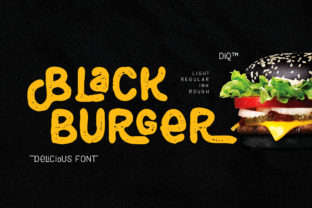
Black Burger isn’t just another display font—it’s a playful, confident typographic voice with rounded edges, bold contrast, and subtle quirks that feel both nostalgic and refreshingly modern. Designed for impact rather than extended reading, it thrives in headlines, logos, social graphics, packaging, and short-form digital signage. Its charm lies in its balance: friendly enough for a café menu or kids’ book cover, yet distinctive enough to anchor a boutique brand identity.
Why People Reach for Black Burger (and Why That’s Not Always Enough)
Many designers—especially those new to typography or pressed for time—gravitate toward Black Burger because it “just looks fun” or “feels on-brand” at first glance. That instinct isn’t wrong. But enthusiasm alone doesn’t guarantee good results. What often gets overlooked is context: where the font will live, how it’ll scale, who will see it, and what job it’s expected to do beyond looking cute.
For example, using Black Burger for body text in a blog post or product description creates real usability issues—not because the font is flawed, but because it wasn’t built for that role. Its tight spacing, high x-height, and strong visual weight can fatigue readers quickly in paragraphs. Similarly, applying it at tiny sizes (under 16px) on mobile screens risks legibility loss, especially for users with mild visual impairments or on lower-resolution devices.
Mistake 1: Assuming “Cute” Means Universally Appropriate
Black Burger’s personality is strong—and that’s a strength *only* when matched intentionally. Slapping it onto a law firm’s website header or a financial dashboard undermines credibility, not because the font is unprofessional, but because tone and audience expectations don’t align. A startup selling handmade ceramics? Great fit. A B2B SaaS platform launching an enterprise security report? Probably not.
Better approach: Ask: “What emotion or action should this text prompt?” If the answer is “trust,” “clarity,” or “precision,” consider pairing Black Burger with a neutral sans-serif (like Inter or Manrope) for supporting text—or reserve it strictly for decorative accents like section dividers or callout badges.
Mistake 2: Ignoring Licensing Before Downloading
Black Burger is widely shared across free font sites—but many of those versions are outdated, lack full character sets (no accented letters, no OpenType features), or worse, violate the designer’s license. Using an unlicensed version in client work—even unintentionally—exposes you to legal risk and may break branding consistency if the font renders differently across systems.
Better approach: Go straight to the source. Check the official foundry or designer’s site (often linked from reputable platforms like Font Squirrel or MyFonts) for clear licensing terms. For commercial use—including websites, apps, or client deliverables—verify whether the license covers web fonts (WOFF/WOFF2), desktop use, or embedded PDFs. When in doubt, email the foundry. Most respond within 48 hours.
Mistake 3: Skipping Kerning and Spacing Adjustments
Black Burger includes built-in kerning pairs, but automatic spacing rarely fits every word. “WOW”, “BOOK”, or “OOZE” can look awkward without manual tweaks—especially in logos or hero banners where every pixel counts. Relying solely on default tracking may result in uneven rhythm or unintended emphasis (e.g., “BLACK BURGER” looking like “BLACKBUR GER”).
Better approach: In design tools like Figma or Adobe Illustrator, enable “Optical Kerning” as a starting point—but then review each headline individually. Zoom in. Toggle between “Metrics” and “Optical” kerning. Adjust letter spacing by ±5–10 units where needed. For web use, test responsive headlines across device widths; sometimes a slight letter-spacing: 0.02em tweak in CSS improves flow without sacrificing personality.
What to Check Before You Commit
- Character coverage: Does the version you’re using support your language? Black Burger typically includes Latin-1 and basic punctuation—but check for currency symbols, fractions, or diacritics if your project requires them.
- Weight variety: The standard Black Burger is a single bold weight. If your design system needs hierarchy (e.g., light subheads + bold titles), plan how you’ll pair it—not stretch or faux-bold it.
- Rendering consistency: Test how it appears in Chrome, Safari, and Firefox—especially with font-smoothing and -webkit-font-smoothing enabled. Some systems render its curves slightly heavier or lighter.
- Load performance (for web): If self-hosting, compress the WOFF2 file and serve only the glyphs you need via unicode-range. Avoid loading the full font stack if you only need uppercase headlines.
A Realistic Example: From Rushed to Refined
A small bakery owner downloaded Black Burger from a random font aggregator, used it for their Instagram bio, menu board, and website banner—and loved how “on-brand” it felt. But customers started asking, “Is it ‘The Black Burger’ or ‘The Black *Burger*’?” because the spacing around the ampersand (&) was too tight, making “& Co.” look like “&Co.”. Worse, their printed takeout bags rendered the font bolder than intended due to outdated PostScript outlines.
The fix wasn’t switching fonts—it was updating to the latest licensed version, adjusting kerning around punctuation in their design files, and specifying font-weight: 900 (not “bold”) in CSS to ensure consistent rendering. They kept Black Burger front-and-center—but now it communicates joy *and* clarity.
Final Thought: Personality Needs Purpose
Black Burger works best when treated like a collaborator—not a shortcut. It won’t fix weak messaging, compensate for poor layout, or make unclear content suddenly compelling. But in the right hands, with thoughtful application, it adds warmth, memorability, and a touch of wit that resonates with real people. Whether you’re a freelancer choosing fonts for a client pitch or a teacher designing classroom posters, ask yourself: “Does this choice serve the reader first—and the aesthetic second?” That balance is where Black Burger truly shines.