Keyboard Font
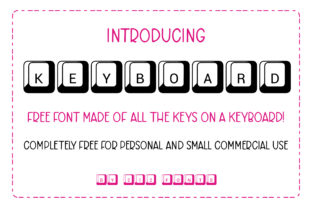
Keyboard is a display typeface designed with visual references to physical computer keyboards—featuring key-shaped letterforms, subtle bevels, grid-aligned spacing, and typewriter-inspired proportions. It is not a system font or a utility typeface for body text; rather, it functions as a stylistic accent, intended for short-form, high-impact uses such as headlines, logos, posters, app interfaces, or branding elements where a deliberate technological or retro-computing aesthetic supports the message.
Unlike monospaced coding fonts like Source Code Pro or Fira Code, which prioritize readability in development environments, Keyboard prioritizes visual character over functional neutrality. Its design cues—rounded corners reminiscent of mechanical keycaps, slight shadow effects suggesting depth, and consistent key-width alignment—anchor it firmly in the realm of expressive typography, not interface usability.
Why Consider Keyboard?
Designers and communicators may explore Keyboard when their project calls for immediate thematic resonance with computing culture, digital nostalgia, or hardware authenticity. It’s especially relevant for contexts where tone and identity matter as much as legibility: a tech workshop poster, an indie game title screen, a podcast about programming history, or a startup branding itself around accessibility and hands-on interaction.
Its appeal lies less in versatility and more in specificity. If your goal is to evoke tactile familiarity—like the sound of a keypress or the layout of a vintage IBM Model M—Keyboard delivers that association quickly and without explanation. That makes it useful for audiences already attuned to computing iconography, including developers, educators in CS fields, makers, and retro-tech enthusiasts.
Practical Benefits and Realistic Expectations
One clear benefit of Keyboard is its strong visual differentiation. In crowded digital spaces—such as app store listings or social media banners—it can help a headline stand out through recognisable form language. Its consistent rhythm and constrained proportions also support tight, controlled layouts, particularly at larger sizes (36pt and up).
However, expectations must be calibrated. Keyboard is not optimized for extended reading. Its decorative features reduce character distinctiveness at small sizes, and its fixed-width structure limits typographic flexibility in responsive settings. It lacks extensive language support, OpenType features (e.g., ligatures, stylistic sets), and variable weight options—common in modern web fonts. Users should verify glyph coverage for required characters, especially accented letters or symbols beyond basic Latin.
Also note: while inspired by keyboards, Keyboard does not replicate actual keycap labeling (e.g., no dedicated “Ctrl”, “Alt”, or function-key glyphs). It is a stylized interpretation—not a functional keyboard simulator.
When Keyboard Fits Well
Keyboard works best in controlled, intentional applications:
- Branding for tech-adjacent initiatives—such as coding bootcamps, hardware startups, or open-source documentation sites aiming for approachable technical credibility.
- Event or campaign visuals—where a limited set of large-format headings benefits from thematic reinforcement (e.g., “Hack the Library” workshop signage).
- Digital product UI elements—like onboarding screens or feature callouts in developer tools, provided contrast, size, and spacing are carefully managed.
- Print or static media—posters, t-shirts, or presentation slides where resolution and viewing distance allow full appreciation of its design details.
In each case, success depends less on the font alone and more on how deliberately it supports hierarchy, tone, and audience recognition. It performs strongest when used sparingly—and only where its conceptual alignment adds meaning, not just decoration.
When to Look Elsewhere
Keyboard is unlikely to serve well in scenarios requiring broad accessibility, multilingual support, or typographic adaptability. For example:
- Body copy or long-form content—its low x-height and uniform width hinder scanning and reading fluency. A humanist sans-serif like Inter or Open Sans remains more appropriate.
- High-contrast or low-vision contexts—the subtle bevels and reduced stroke contrast can impair legibility against busy backgrounds or at small sizes.
- Global or multilingual projects—if your audience includes speakers of languages using diacritics, Cyrillic, or non-Latin scripts, confirm whether Keyboard includes those glyphs before committing.
- Performance-sensitive web environments—as a display font, it may add to page weight if served as a custom web font without subsetting or modern format optimization (e.g., WOFF2).
Alternatives worth evaluating include IBM Plex Mono (for balanced tech credibility with full language support), JetBrains Mono (for developer-facing interfaces needing clarity), or Orbitron (a geometric, futuristic sans with broader weights and licensing flexibility). Each serves different priorities—legibility, extensibility, or scalability—so comparison should begin with use-case requirements, not stylistic preference.
Making a Practical Decision
To determine whether Keyboard aligns with your needs, start by listing your core constraints and goals:
- What is the primary role of the text? Is it informational (e.g., instructions), expressive (e.g., brand voice), or navigational (e.g., menu labels)? Keyboard suits expressive roles best.
- Where and how will it be read? Consider environment (print vs. screen), device (desktop vs. mobile), and typical viewing distance. Avoid it for small, dynamic, or low-resolution contexts.
- Who is the audience? Does familiarity with keyboard aesthetics enhance understanding—or risk alienating non-technical viewers? Test with representative users if possible.
- What technical requirements exist? Check licensing (some versions are free for personal use only), file formats available, and compatibility with your design or development stack.
If your answers point toward short, thematic, visually driven applications—and you’ve confirmed technical and accessibility fit—Keyboard can be a purposeful choice. If flexibility, readability, or inclusivity are higher priorities, reserve it for secondary accents and pair it with a robust, neutral workhorse font for supporting text.
Ultimately, typography serves communication—not aesthetics alone. Keyboard earns its place not by being universally applicable, but by solving a narrow set of visual and conceptual problems with clarity and consistency. Evaluating it objectively means asking not “Is it interesting?” but “Does it make the message clearer, more memorable, or more authentic—for this audience, in this context?”