Bodyguard: Bold Tattoo-Inspired Display Font
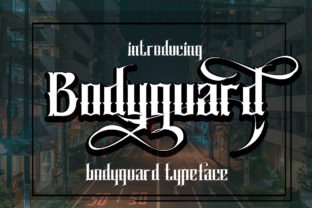
Bodyguard isn’t just another bold font—it’s a confident, expressive typeface rooted in the rich visual language of classic American tattoo lettering. Think strong outlines, balanced weight, and that unmistakable hand-crafted presence—but refined for clarity, versatility, and modern use. Whether you’re designing a band poster, launching a small-batch coffee brand, or crafting an Instagram story that stops the scroll, Bodyguard brings instant character without sacrificing readability.
What Makes Bodyguard Stand Out
At its core, Bodyguard is a display font—meaning it shines brightest at larger sizes, like headlines, logos, signage, or social media banners. It’s not built for body text, and that’s intentional. Its strength lies in impact: thick strokes, subtle tapering on terminals, and carefully tuned spacing give it rhythm and presence. Unlike many tattoo-style fonts that lean heavily into grit or distress, Bodyguard balances authenticity with polish. It feels lived-in but professional—rebellious yet reliable.
The “unique twist” comes in its thoughtful proportions and open counters (the enclosed spaces inside letters like O, e, or a). These details keep it legible even when scaled down slightly—say, on a product label or mobile ad—and help it pair beautifully with cleaner sans-serif or serif companions.
Who Benefits Most From Using Bodyguard
If you’ve ever stared at a blank design canvas wondering how to make your message feel *real*, not just readable—Bodyguard might be what you’ve been missing. Small business owners love it for packaging and storefront signs because it conveys craftsmanship and confidence. Bloggers and content creators use it to reinforce personal branding—imagine a podcast logo or YouTube thumbnail where tone matters as much as topic. Educators building workshop materials or event flyers find it adds energy without distraction. Even hobbyists printing custom T-shirts or greeting cards appreciate how quickly it elevates their work from “nice” to “noticed.”
Real-World Uses That Work Well
- Coffee shop branding: A chalkboard-style menu header or bag stamp using Bodyguard instantly signals artisanal care and local roots.
- Festival posters: Paired with a neutral secondary font, Bodyguard gives lineups and dates undeniable presence—even from across a crowded room.
- Instagram Stories & Reels: Overlaying short phrases (“New Drop,” “Limited Edition”) in Bodyguard makes them pop against dynamic backgrounds.
- Book covers & zines: Especially for memoirs, poetry collections, or indie comics, it adds emotional texture without overwhelming the narrative.
- Wedding stationery: Surprisingly effective for rustic-chic or vintage-modern invites—especially when used sparingly for names or dates.
How to Use Bodyguard Thoughtfully
Like any strong personality, Bodyguard works best when given space to breathe. Avoid cramming it into tight columns or stacking multiple decorative fonts together. Instead, try pairing it with a clean, humanist sans-serif (like Inter or Poppins) for contrast and balance. For print projects, check how ink spread affects fine details—some printers may require slight outline adjustments for crispness at small sizes.
Also consider context: while Bodyguard evokes tradition and authenticity, it may feel out of place in highly technical, corporate, or ultra-minimalist settings—like a fintech dashboard or academic journal header. That doesn’t mean it’s “limited”—just that intentionality matters. Ask yourself: does this project benefit from warmth, identity, and visual voice? If yes, Bodyguard likely fits.
Getting Started Is Simple
No design degree required. Most platforms—Canva, Adobe Express, Figma, and even newer AI-powered tools—support custom font uploads. Once installed, start small: swap your current headline font for Bodyguard in one mockup. Try it in all caps for maximum punch, or use title case to soften the tone slightly. Adjust letter spacing by +10–20 units for tighter cohesion, or leave it at default for classic breathing room.
For beginners, here’s a low-risk experiment: create a single Instagram post using Bodyguard for the main headline only—keep captions and hashtags in a simple, readable font. Compare it side-by-side with your usual style. Notice how attention shifts. That’s Bodyguard doing its job: turning visual noise into memorable signal.
Things to Keep in Mind Before You Commit
Bodyguard is designed for emphasis—not endurance. Don’t use it for long paragraphs, data tables, or accessibility-critical interfaces (like forms or legal disclaimers), where clarity and screen reader compatibility are non-negotiable. Also, licensing varies: some versions allow personal use only, while others include commercial rights. Always verify permissions before using it in client work or merchandise.
And remember—fonts don’t carry meaning on their own. Bodyguard gains power from *how* and *why* you use it. A tattoo-inspired font on a law firm’s website might raise eyebrows; on a custom leather goods brand’s homepage, it tells a cohesive story about heritage, durability, and individuality.
Final Thought: It’s About Voice, Not Just Visuals
In a world saturated with generic templates and algorithm-driven designs, choosing a font like Bodyguard is quietly radical. It says you value distinction over default, authenticity over automation. You don’t need to overhaul your entire brand to start—just one headline, one sign, one story frame. Let Bodyguard anchor that moment. Let it stand guard over your message, giving it the boldness and beauty it deserves.