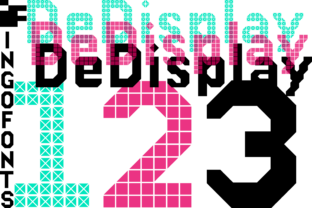
DeDisplay: A Bold, Tech-Inspired Display Font for Purposeful Design
DeDisplay stands out in the crowded landscape of display typefaces—not by chasing trends, but by balancing personality with precision. It’s a geometric sans-serif designed for impact and legibility at larger sizes, built with subtle digital cues that nod to interface design, data visualization, and modern branding without veering into novelty territory. Unlike fonts that rely on gimmicks or excessive contrast, DeDisplay earns its presence through consistent rhythm, confident proportions, and restrained intelligence.
What Makes DeDisplay Distinctive—Beyond the Surface
At first glance, DeDisplay feels familiar—clean, structured, and confidently bold. But closer inspection reveals thoughtful details: terminals are gently squared rather than sharply cut, letterforms maintain even visual weight across weights, and spacing is calibrated for both tight headlines and generous typographic hierarchy. The uppercase “M” and “W” avoid optical narrowing, while the lowercase “a” and “g” use a single-story construction that reinforces clarity at a distance or on screen.
The font family includes six weights (Thin to Black), each with matching italics, and supports Latin-1, Latin Extended-A, and basic Cyrillic character sets. OpenType features include standard ligatures, discretionary ligatures, case-sensitive forms, and tabular numerals—practical tools for publishing, presentations, and web-based dashboards where typographic control matters.
Where DeDisplay Excels in Real Projects
DeDisplay performs best where typography needs to communicate authority and forward motion—without sacrificing readability. It’s especially effective in contexts where brand voice leans toward innovation, clarity, or structured creativity: SaaS product interfaces, tech conference identities, editorial mastheads, podcast cover art, or startup pitch decks.
For example, a climate analytics platform used DeDisplay Bold for dashboard section headers and report titles. Its uniform stroke contrast helped distinguish data categories at a glance, while its neutral-yet-engaged tone reinforced trust without sounding clinical. Similarly, an independent education newsletter adopted DeDisplay Medium for article teasers—its generous x-height and open counters improved scanability on mobile, and its restrained tech aesthetic aligned with their mission of accessible, evidence-based learning.
It also holds up well in motion graphics and video overlays. Because its shapes avoid extreme thinning or exaggerated geometry, DeDisplay renders cleanly at lower resolutions and scales predictably across devices—from smartwatch previews to 4K presentation screens.
Usability and Integration Considerations
DeDisplay is not intended for body text. Its design prioritizes presence over paragraph flow, and its tighter default tracking can feel cramped in long-form reading. That’s intentional—and important to acknowledge. Using it for UI labels or navigation menus works only when paired with a highly legible companion (like Inter, Source Sans Pro, or IBM Plex Sans) for supporting text. Without that balance, interfaces risk visual fatigue or reduced scannability.
Web performance is solid: the variable font version (available via licensed distribution) allows selective loading of axes like weight and width, minimizing payload. Self-hosting is straightforward, and fallback strategies are manageable given its clear stylistic category. However, designers should test rendering across Windows (especially older Edge versions) and legacy Android browsers—some hinting behavior varies slightly, though not enough to compromise core legibility.
Audience Fit: Who Benefits Most?
Freelancers building brand systems for early-stage tech clients often find DeDisplay valuable—it delivers distinction without demanding custom illustration or animation to stand out. Educators designing course modules appreciate how its clean structure supports visual learning frameworks, particularly when labeling diagrams or highlighting key concepts. Small business owners launching e-commerce sites benefit from its ability to unify product names, promotional banners, and social thumbnails under one cohesive, scalable identity.
Marketers running A/B tests on landing page headlines report measurable lift when swapping generic sans-serifs for DeDisplay Medium or SemiBold—particularly among audiences aged 28–45 evaluating B2B tools or subscription services. The effect isn’t dramatic in isolation, but compounds when paired with strong information architecture and intentional whitespace.
That said, DeDisplay isn’t ideal for every context. Brands rooted in heritage, organic craft, or handwritten warmth may find its digital sensibility misaligned. Likewise, designers working under strict accessibility mandates should verify contrast ratios carefully—its boldest weights pair well with dark backgrounds, but lighter weights require deliberate background choices to meet WCAG AA standards.
Long-Term Value and Design Longevity
DeDisplay avoids the trap of over-personalization. It doesn’t mimic code, circuitry, or glitch aesthetics—choices that date quickly. Instead, its technological feel emerges from proportion, spacing, and structural logic—qualities that remain relevant across design cycles. That makes it a sound investment for teams building design systems meant to last 3–5 years or more.
Licensing is straightforward: desktop, web, app, and ePub use are covered under standard commercial licenses. There’s no freemium tier or usage cap, which simplifies procurement for agencies managing multiple client projects. Updates are infrequent but meaningful—recent releases refined hinting for smaller sizes and expanded language support based on user feedback, signaling ongoing, user-informed development.
Practical Recommendations for Getting Started
Start with DeDisplay SemiBold or Bold for primary headlines—these weights offer the strongest balance of presence and neutrality. Reserve Thin and ExtraLight for subtle accents, like watermarking or secondary metadata, where delicacy is needed without fragility.
Pair intentionally. For digital interfaces, combine with a humanist sans (e.g., Nunito or Lato) for body copy. In print, consider a low-contrast serif like Literata or PT Serif for captions and pull quotes. Avoid pairing with other geometric display fonts—the risk of visual redundancy is high.
Test hierarchy early. Because DeDisplay’s weights shift dramatically in visual mass, a jump from Regular to Bold can overwhelm adjacent elements. Use size, color, and spacing—not just weight—to layer meaning. One designer found success using DeDisplay Medium at 36px for section titles, then dropping to DeDisplay Light at 24px for subheads—rather than relying solely on weight changes.
Finally, treat it as a tool—not a solution. DeDisplay won’t fix weak messaging or inconsistent layout. But when applied with attention to context, audience, and purpose, it strengthens intentionality. It helps signal that a project was considered—not just assembled.
In a field where many display fonts prioritize flair over function, DeDisplay offers something rarer: quiet confidence. It doesn’t shout to be seen. It earns attention by holding space with clarity, consistency, and a subtle sense of what’s next.