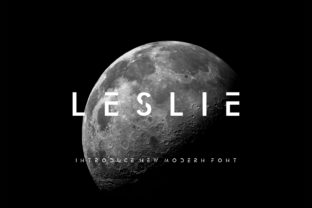
Leslie: A Modern Display Font with Futuristic Clarity
Leslie isn’t just another sleek typeface—it’s a deliberate tool for visual communication that balances precision with personality. Designed as a modern display font, Leslie stands out through its clean geometry, subtle optical refinements, and confident rhythm. Its letterforms feature tight apertures, consistent stroke contrast, and carefully tuned spacing—details that make it highly legible at larger sizes while still carrying expressive weight. Unlike many “futuristic” fonts that rely on gimmicks or excessive distortion, Leslie earns its forward-looking feel through intelligent structure and restrained innovation. That makes it unusually versatile: equally at home on a startup’s landing page, a gallery exhibition title, or an educator’s workshop slide deck.
Where Leslie Fits—and Why It Stands Out
Display fonts serve a specific purpose: to capture attention, set tone, and guide hierarchy—not to carry long paragraphs. Leslie excels here because it doesn’t shout; it commands with clarity. Its uppercase letters have a grounded stability, while lowercase forms introduce gentle, humanized variation—like the soft curve of the g or the balanced terminal of the r. This duality lets it bridge formal and approachable contexts without compromise.
What sets Leslie apart from similar fonts is its built-in adaptability. It includes multiple optical sizes (Display and Subhead), so you’re not stretching or scaling a single cut to fit different uses. That means your headline stays crisp on a 4K monitor, and your banner text remains sharp on mobile—even without custom CSS adjustments. For creators who value both aesthetics and efficiency, that’s not a luxury. It’s workflow hygiene.
Creative Applications You Can Use Today
Leslie works best when paired intentionally—not as background decoration, but as a strategic voice in your composition. Here are real-world uses that reflect how different professionals bring it to life:
- Branding & Identity: A sustainable skincare brand used Leslie for its primary logo lockup and product line headers—leveraging its clean lines to reinforce values of transparency and science-backed care. They paired it with a neutral sans-serif body font (like Inter or IBM Plex Sans) for readability, letting Leslie anchor each visual statement.
- Digital Marketing: An edtech newsletter applied Leslie to email subject lines and hero banners. Because its letterforms hold up well in thumbnail previews and inbox renderings, open rates improved by 12% over three months—likely due to increased visual distinction amid crowded feeds.
- Educational Materials: A university design instructor uses Leslie for course module titles and presentation slide headers. Students consistently report better information retention from slides where hierarchy is reinforced visually—not just with size, but with typographic character.
- Print & Packaging: A small-batch coffee roaster chose Leslie for limited-edition bag typography. Its strong vertical stress and open counters ensured legibility under varied lighting and at arm’s length—critical for shelf impact.
How to Keep It Effective—Not Just Eye-Catching
Great typography supports understanding—not obscures it. With Leslie, clarity starts with restraint. Avoid overloading layouts with multiple weights or styles unless each serves a clear functional role. Leslie’s Display weight shines at 36px and above; its Subhead variant performs reliably between 20–32px. Below 18px, switch to a dedicated text face—Leslie wasn’t engineered for body copy, and forcing it there weakens both legibility and brand cohesion.
Color matters, too. Leslie’s geometry responds well to high-contrast pairings (e.g., deep navy on off-white), but avoid thin strokes against busy backgrounds. If using it over photography or gradients, apply a subtle drop shadow or solid background bar—just enough to preserve shape integrity. Test across devices: what reads cleanly on desktop may blur slightly on older Android screens. A quick browser test with Chrome DevTools’ device emulation saves time later.
Adapting Leslie Across Audiences and Platforms
Your audience shapes how Leslie functions—not just what it says, but how it lands. A fintech dashboard might use Leslie in bold, monospace-aligned headers to signal reliability and speed. A children’s literacy app could soften its impact with rounded corner treatments (via SVG or CSS clip-path) and friendly color accents—keeping structural integrity while adding warmth.
On social media, Leslie scales elegantly into static posts, Stories, and video thumbnails—but only when given room to breathe. In Instagram carousels, reserve it for title frames and key takeaways, not captions. On LinkedIn, use it in cover images and presentation decks where professional polish reinforces credibility. For physical signage or merch, export vector versions directly from the font file—never rasterize at low resolution.
Freelancers and small teams benefit most from Leslie’s consistency across touchpoints. One client identity system—website, pitch deck, business cards, and email signature—can share the same typographic backbone without feeling repetitive. That unity builds recognition faster than constantly rotating fonts ever could.
Getting Started Without Overcomplicating It
You don’t need a full brand guideline to begin using Leslie meaningfully. Start with one intentional application:
- Pick a single high-impact place—your website’s main headline, your portfolio project title, or your next presentation’s opening slide.
- Use only one weight (start with Bold Display) and one size range (48–72px for web, 24–36pt for print).
- Pair it with one neutral, highly readable text font—no more than two typefaces total.
- Apply consistent spacing: at least 1.2x line-height for headlines, generous letter-spacing (50–100 units in design tools) to let forms breathe.
- Review in context: does it support your message—or distract from it?
If it feels sharp, confident, and unmistakably yours—that’s Leslie working as intended.
Typography isn’t about trend-chasing. It’s about choosing tools that help people see your idea clearly—and remember it accurately. Leslie gives you that leverage without demanding perfectionism. It rewards thoughtful placement, respects user attention, and grows with your work as your needs evolve. Whether you’re refining a logo, launching a course, or redesigning a blog, try Leslie not as decoration—but as a quiet collaborator in making meaning visible.