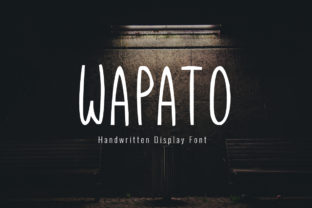
Wapato: A Friendly Display Font with Modern Charm
If you’ve ever scrolled past a website, social post, or printed flyer and paused—just for a second—because the typography felt unexpectedly warm and inviting, you’ve likely encountered the quiet magic of a well-chosen display font. Wapato is one of those rare typefaces that lands somewhere between approachable and intentional: simple enough to feel handmade, refined enough to hold its own in professional settings.
Designed as a display font—not for long paragraphs but for moments that need presence—Wapato excels where personality matters most. Its rounded terminals, gentle curves, and balanced proportions give it a soft, human rhythm. It’s not overly playful, nor is it sterile. Instead, it carries a subtle confidence: friendly without being cutesy, modern without feeling cold.
What Makes Wapato Stand Out
At first glance, Wapato looks deceptively simple. But simplicity here is deliberate—not minimalism for its own sake, but clarity rooted in intention. Its lowercase ‘a’, ‘g’, and ‘e’ have open, airy shapes that improve legibility at larger sizes. The uppercase letters maintain visual weight without heaviness, and spacing is thoughtfully tuned for both digital screens and print output.
Unlike many display fonts that rely on exaggerated quirks or novelty strokes, Wapato earns attention through consistency and restraint. It has just enough character to avoid blending into the background—but never so much that it distracts from the message. That balance is why designers reach for it when they want authenticity without sacrificing polish.
Where Wapato Fits in Real Workflows
Think beyond “just another font.” Wapato works best when it serves a purpose—not decoration, but communication with warmth. Here’s how professionals across fields are using it effectively:
- Branding & Identity: Small businesses, independent studios, and wellness brands use Wapato for logos and taglines where trust and accessibility matter. A local bakery might pair it with a clean sans-serif body font for packaging—immediately signaling care and craft.
- Digital Marketing: Email headers, Instagram story text overlays, and landing page headlines benefit from Wapato’s high visual recognition at small-to-medium sizes. It performs especially well on mobile, where clarity and emotional resonance drive engagement.
- Educational Materials: Teachers and course creators apply Wapato to slide titles, worksheet headers, or digital handouts. Its openness helps reduce cognitive load—especially for younger learners or neurodiverse audiences—without infantilizing content.
- Creative Publishing: Indie publishers and zine makers choose Wapato for cover titles and chapter headings. Its personal feel reinforces author voice, while its structure holds up under varied printing conditions.
- Internal Tools & Dashboards: Surprisingly, some product teams use Wapato sparingly in UI—like dashboard welcome messages or empty-state illustrations—to soften technical interfaces and reinforce company culture.
Pairing Wapato Thoughtfully
Wapato shines brightest when paired with contrast—not competition. Its friendly nature pairs naturally with neutral, highly legible sans-serifs like Inter, Lato, or even system fonts like Segoe UI or San Francisco. Avoid pairing it with other display fonts unless there’s clear hierarchy and intent (e.g., Wapato for a headline + a bold monospace for a subhead in a developer-focused announcement).
When setting Wapato, respect its rhythm: generous line-height (1.4–1.6), modest tracking (0–20 units depending on size), and careful sizing. At 32px and above, it breathes. Below 24px, test readability—especially on lower-DPI screens or in email clients where rendering varies.
Practical Considerations Before You Commit
Wapato isn’t a universal solution—and that’s part of its strength. Before licensing or embedding it, ask yourself:
- Is this a display context? If you’re typesetting body copy, instructions, or dense data tables, reach for something more functional. Wapato isn’t built for extended reading.
- Does your audience respond to warmth? Finance dashboards or legal disclaimers may call for gravitas over geniality. Use Wapato where empathy, creativity, or approachability aligns with your goal.
- How will it render across devices? Test in real email clients, older browsers, and iOS vs. Android. While Wapato has solid webfont support, always include a robust fallback stack.
- What’s your licensing scope? Check whether your intended use—client work, SaaS platform integration, merchandise—falls within the license terms. Some versions allow unlimited commercial use; others require extended licenses for embedded applications.
Also worth noting: Wapato includes standard OpenType features like ligatures and stylistic alternates—but these are subtle, not showy. They enhance texture, not transformation. Use them selectively, not automatically.
Why It Resonates Now
In an era where AI-generated visuals flood feeds and interfaces grow increasingly uniform, people respond to signals of human intention. Wapato doesn’t try to be everything—it knows its role. That focus makes it reliable. That warmth makes it memorable.
You’ll find it on a coffee shop’s chalkboard menu, a nonprofit’s annual report cover, a podcast’s episode thumbnail, or a teacher’s classroom poster. Not because it’s trendy—but because it quietly supports meaning. It says, “This matters,” without shouting. It says, “You’re welcome here,” without over-explaining.
For creators who value clarity *and* connection, Wapato offers a rare middle ground: modern enough to feel current, grounded enough to feel sincere. It won’t solve every design problem—but when the problem is making something feel human, it’s often the right place to start.