Far Life: A Light, Authentic Display Font for Distinctive Visual Communication
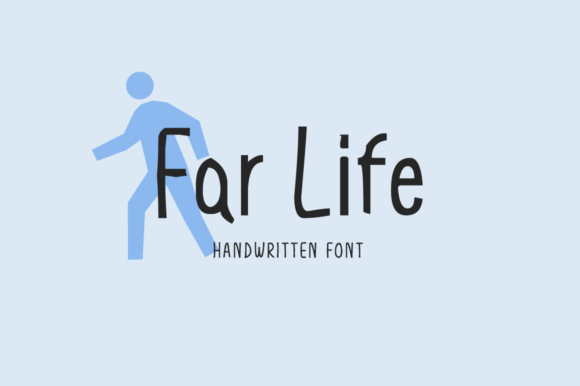
Far Life is a display font that balances elegance with approachability—light in weight, expressive in character, and grounded in authenticity. It’s not designed for body text or dense interfaces. Instead, Far Life excels where clarity meets personality: headlines, logos, posters, social media graphics, book covers, and short-form web banners. Its subtle irregularities—slight variations in stroke contrast, gentle curve asymmetry, and organic rhythm—give it warmth without sacrificing legibility. That authenticity isn’t decorative; it’s functional. It helps viewers register tone faster, align visual messaging with voice, and distinguish a brand or project amid visual noise.
Where Far Life Fits in Your Design Workflow
Fonts aren’t isolated assets—they’re part of a chain: strategy → structure → style → execution → review. Far Life enters most naturally at the style and execution stages, but its impact ripples backward and forward. Before opening your design tool, ask: What impression must this piece convey? Who needs to feel seen by it? If the answer leans toward sincerity, calm confidence, or thoughtful creativity—not bold authority or playful whimsy—Far Life becomes a strong candidate. It’s especially effective when your message relies on nuance over volume.
For example, an educator launching a mindfulness course might pair Far Life headlines with a neutral sans-serif body font like Inter or Open Sans. The contrast supports hierarchy while keeping tone consistent: the headline invites, the body informs. Similarly, a small business owner redesigning their website homepage may use Far Life for the hero section tagline (“Clarity begins here”)—then switch to a more functional typeface for navigation and feature descriptions. This selective application respects both aesthetic intent and usability standards.
Integration With Common Tools and Platforms
Far Life works seamlessly across modern design and publishing environments. It’s available in standard OTF and WOFF2 formats, making it compatible with Figma, Adobe Creative Cloud (Illustrator, Photoshop, InDesign), Canva (via upload), and most CMS platforms that support custom fonts—including WordPress, Webflow, and Squarespace. When embedding on the web, serve it via @font-face with appropriate fallbacks (e.g., font-family: "Far Life", system-ui, -apple-system, sans-serif;) to ensure graceful degradation.
For print projects, export vector-based artwork from Illustrator or InDesign to preserve crisp edges at any scale. Avoid rasterizing Far Life unless necessary—its light weight benefits from clean rendering. In collaborative settings, share the font file with team members using agreed-upon naming conventions (e.g., FarLife-Regular.woff2) and document usage guidelines in your brand asset library. Consistency starts with clear file management—not just visual rules.
Practical Implementation Tips
- Pair intentionally: Far Life shines alongside clean, highly legible sans-serifs or restrained serifs. Avoid pairing it with other display fonts or overly decorative typefaces—visual competition dilutes its impact.
- Respect spacing: Its light weight demands generous letter-spacing (tracking) in large sizes—typically +20 to +50 units depending on size and medium. Tight tracking risks fragility; too much undermines cohesion.
- Test at real sizes: What reads beautifully at 96px on screen may vanish at 48px on mobile. Preview across devices early. Use browser dev tools or Figma’s responsive preview to validate readability.
- Limit scope: Apply Far Life to no more than one or two key typographic elements per layout. Overuse flattens hierarchy and weakens emotional resonance.
- Consider color contrast: Its thin strokes require higher contrast against backgrounds—especially for accessibility. Aim for at least a 4.5:1 ratio for text under 24px, per WCAG guidelines.
Using Far Life Across Project Phases
Far Life isn’t tied to a single phase—it adapts. In planning, it can inform mood boards and brand direction exercises. Seeing your core message rendered in Far Life often reveals whether the tone matches your intended audience. During creation, it anchors visual identity: a podcast logo using Far Life signals reflective storytelling; a workshop flyer sets expectations for grounded, human-centered learning. In review, step back and ask: Does this font help the viewer understand *why* this matters—not just *what* it says?
For freelancers pitching to clients, including a mockup with Far Life in the headline demonstrates attention to tonal alignment—not just aesthetics. For educators designing slide decks, applying Far Life to section headers (not bullet points) creates breathing room and reinforces thematic transitions. Even in rapid prototyping, swapping a default system font for Far Life during user testing can surface unexpected reactions—sometimes revealing misalignment between voice and visual delivery before development begins.
Long-Term Usability and Maintenance
Far Life holds up well over time because it avoids trend-driven extremes. It doesn’t mimic handwriting, distort letterforms for novelty, or rely on stylistic gimmicks that date quickly. That makes it suitable for brands building equity over years—not just campaigns lasting months. To maintain consistency, document usage rules in your internal style guide: minimum size thresholds, approved pairings, color constraints, and prohibited contexts (e.g., “Never used for legal disclaimers or data tables”).
When updating assets—like refreshing a newsletter template or migrating to a new platform—audit existing uses of Far Life. Does the current implementation still serve the goal? Has the surrounding design evolved in a way that now clashes with its lightness? Revisiting font usage isn’t about change for change’s sake; it’s about ensuring every element continues to function as intended.
Real-World Workflow Examples
A blogger launching a personal essay series: Uses Far Life for post titles in featured images and email subject lines. Keeps body text in a readable serif (e.g., Charter) for long-form comfort. Saves time by creating a Figma template with pre-set styles, spacing tokens, and export presets—so each new post starts with aligned typography.
A small studio designing packaging for a sustainable skincare line: Applies Far Life to front-panel product names and ingredient highlights. Ensures all copy fits within print-safe margins and passes contrast checks on matte kraft paper. Stores font files in a shared cloud folder with version history—so interns and contractors access the same source, avoiding substitution errors.
An entrepreneur building a Notion workspace for client onboarding: Embeds Far Life via custom CSS (using a self-hosted WOFF2) for page titles and milestone headers—keeping notes, timelines, and resources in a neutral, highly scannable sans-serif. The distinction helps clients mentally separate strategic framing from operational detail.
What Far Life Is Not—and Why That Matters
Far Life isn’t a system font. It won’t replace your interface typeface or handle paragraph text. It’s not optimized for UI components like buttons or form fields. It doesn’t offer extensive language support out of the box—check the character set if you need extended Latin, Cyrillic, or diacritical coverage. And it’s not meant to be stretched, condensed, or heavily distorted in design tools; its integrity lives in its original proportions.
Understanding those boundaries isn’t limiting—it’s clarifying. It lets you deploy Far Life with purpose, not habit. When you choose it, you’re choosing a specific kind of emphasis: quiet confidence, considered presence, human-scale distinction. That intentionality multiplies its value across every project it touches.