Upthrust: A Light & Elegant Display Font
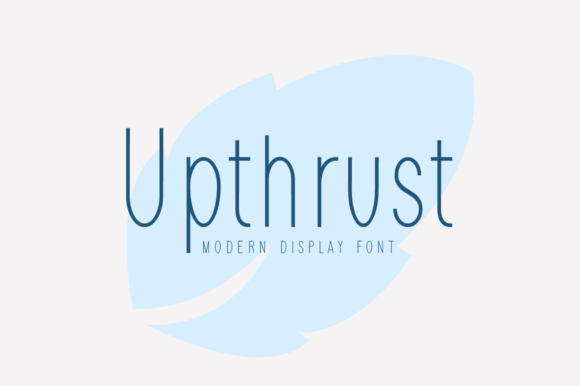
Upthrust is a display font that feels both effortless and intentional — light in weight, rich in character, and quietly confident in presence. It’s not loud or aggressive; instead, it carries elegance through clean geometry, subtle contrast, and a gentle upward energy built into its letterforms. That lift — the “upthrust” — isn’t just in the name. It’s visible in the rising terminals of letters like a, c, and s, and in the buoyant rhythm of spaced-out headlines. For creators who value clarity without compromise, Upthrust offers a refined alternative to overused sans-serifs or overly ornate scripts.
What Makes Upthrust Stand Out
Unlike many display fonts that rely on dramatic serifs, sharp angles, or heavy embellishment, Upthrust draws attention through restraint. Its open apertures improve legibility at larger sizes, while its modest x-height and generous spacing prevent visual crowding. The lowercase g and y feature graceful, single-story forms — friendly and modern without sacrificing distinction. And because it’s designed for display use (not body text), it performs best where impact matters most: headlines, logos, posters, packaging, and digital banners.
It’s also versatile in tone. Pair it with a neutral sans-serif like Inter or Lato for balance, and Upthrust can read as sophisticated and calm. Set it boldly over a textured background or with soft shadowing, and it becomes quietly expressive — ideal for brands that want warmth without whimsy, or authority without austerity.
Creative Uses Across Projects and Platforms
Designers and small business owners often ask: “Where does this actually work?” Here are grounded, real-world applications — not hypotheticals:
- Branding for wellness studios or mindful retailers: Upthrust’s lightness supports messages around calm, growth, and intention. A yoga studio might use it for class names on signage (“Breath & Balance”, “Morning Flow”) — legible, uplifting, and never clinical.
- Digital course thumbnails and social headers: On platforms like Instagram or Teachable, where first impressions happen in under two seconds, Upthrust delivers instant readability and tonal alignment. Try it in white over muted sage or warm clay — no extra effects needed.
- Book covers and editorial features: Especially for nonfiction titles about creativity, education, or personal development, Upthrust adds quiet authority. It avoids the coldness of ultra-thin fonts and the fatigue of condensed ones — making titles feel approachable yet substantial.
- Product packaging for artisan goods: Think ceramic mugs, small-batch teas, or handmade candles. Upthrust pairs beautifully with hand-drawn icons or minimalist photography. Its openness leaves room for tactile materials — kraft paper, linen textures, spot UV — to shine alongside the type.
How Different Creators Can Adapt It Thoughtfully
Not every project needs the same treatment — and Upthrust rewards thoughtful adaptation. Here’s how various users can tailor it without losing coherence:
For marketers and small business owners
Use Upthrust consistently for primary headlines only — never body copy. Define one size range (e.g., 48–96px for web, 36–72pt for print) and stick to it across all assets. This builds recognition without overexposure. Avoid stretching or skewing the font — its integrity lies in its natural proportions. If your brand voice is warm but professional, pair Upthrust with a humanist sans for subheads and captions.
For educators and course creators
Apply Upthrust to module titles and section dividers — not slide bullet points or PDF footnotes. In presentations, increase line height slightly (1.4–1.6) to preserve airiness. When exporting slides for accessibility, ensure contrast meets WCAG AA standards (e.g., dark gray on off-white, not light gray on beige). A simple rule: if it’s meant to be read silently, choose a more functional text font. If it’s meant to be felt — even before it’s fully read — Upthrust earns its place.
For bloggers and content publishers
Use it selectively in hero sections or featured post headers — not site-wide H1s. Test loading performance: serve it as a font-display: swap via Google Fonts or self-hosted CSS to avoid invisible text during load. Consider fallback stacks like Upthrust, -apple-system, BlinkMacSystemFont, 'Segoe UI', sans-serif so hierarchy remains intact even if the font fails to load.
Keeping It Clear, Consistent, and Audience-Friendly
Elegance shouldn’t come at the cost of clarity. To keep Upthrust effective:
- Respect scale: It shines above 36px. Below that, details blur and spacing collapses. For smaller interface elements (buttons, tags), switch to a legible system font.
- Maintain contrast: Avoid placing it over busy photos or low-contrast gradients. A solid color block behind the text — even 10% opacity black — often improves focus more than complex masking.
- Limit weight variation: Upthrust is typically offered in one weight (regular). Don’t fake boldness with CSS
font-weight: 700— it distorts letterfit. Instead, adjust size, color, or spacing to create hierarchy. - Test across devices: On mobile, increase tracking (letter-spacing) by +20–40 units to prevent crowding. What looks airy on desktop can feel tight on a 375px viewport.
Ideas to Try This Week
You don’t need a full rebrand to explore Upthrust meaningfully. Try one of these low-lift experiments:
- Redesign your email newsletter header using Upthrust for the subject line — keep everything else unchanged. Notice how much more intentional the top of the inbox feels.
- Create a printable quote card (e.g., for Instagram Stories or workshop handouts) with a short line of text in Upthrust, centered over a solid pastel background. No filters, no borders — just type and tone.
- Sketch three logo lockups for a fictional local business (a florist, a co-working space, a children’s book illustrator) — each using Upthrust as the only type element. Focus on spacing, not decoration.
Upthrust doesn’t solve every typographic challenge — and it shouldn’t. Its strength lies in specificity: when you need lightness with presence, simplicity with distinction, or elegance without effort. It works because it respects the viewer’s time and attention. Used well, it doesn’t shout. It lifts — gently, clearly, and with purpose.