Witham Family: A Retro-Strong Display Font That Delivers—If You Use It Right
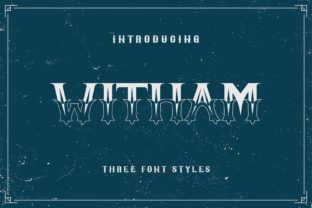
Witham Family isn’t just another retro-inspired typeface—it’s a thoughtfully crafted display font family that balances vintage charm with modern clarity. Designed for impact, Witham excels in headlines, logos, posters, and short-form branding where personality and legibility matter equally. Its strong letterforms, subtle geometric quirks, and warm, analog-inspired rhythm give it presence without shouting. But here’s what many overlook: Witham Family shines brightest when used intentionally—not as a default “vintage” shortcut.
Assuming Witham Works Everywhere (It Doesn’t)
One of the most common missteps? Dropping Witham into body text, email newsletters, or UI buttons without testing readability at small sizes. Witham is a display font—its character count, spacing, and contrast are optimized for 24pt and up. At 14pt on screen or in print, details like tight counters in “e” and “a”, or delicate serifs on “T” and “L”, can blur or disappear entirely.
Example: A freelance designer chose Witham for an entire restaurant menu—headline *and* dish descriptions. Customers struggled to scan items quickly, and staff reported frequent misreads (“beetroot” mistaken for “beefroot”). The fix? Keep Witham for the restaurant name and section headers only, then pair it with a clean, highly legible sans-serif (like Inter or Open Sans) for descriptions. That preserves Witham’s charm while ensuring usability.
Misjudging Licensing—and Paying More (or Less) Than You Should
Witham Family is available under multiple licensing models: web-only, desktop, app embedding, and extended commercial use. Yet many users assume “one license fits all”—especially freelancers bundling fonts into client deliverables or educators sharing assets across school platforms.
Here’s what happens when licensing is overlooked: A small business owner bought a single-user desktop license, then uploaded Witham to their Shopify theme via custom CSS. When traffic spiked, the site triggered a font-hosting violation—and their live storefront briefly displayed fallback system fonts instead of headlines. No warning. No graceful fallback built in.
Before downloading or purchasing, ask yourself: Will this be used on a public website? In a mobile app? In client-branded templates you’ll distribute? If yes, confirm the license explicitly covers those uses. Reputable vendors list usage rights clearly—and many offer bundled licenses for agencies or educators. Don’t guess. Check.
Skipping Pairing Strategy (and Losing Visual Hierarchy)
Witham’s retro strength can unintentionally dominate—especially if paired with other decorative or high-contrast fonts. We’ve seen blogs use Witham for headlines *and* pull quotes *and* call-to-action buttons, creating visual noise instead of focus. Without contrast in weight, scale, or structure, Witham’s personality gets diluted, not amplified.
Better approach: Anchor Witham with a neutral, humanist sans-serif. Think not Montserrat Bold (too similar in energy), but rather Lato Regular or Source Sans Pro Light. These provide breathing room, support scannability, and let Witham’s character lead—without competing. Test your pairing at actual size: zoom out to 50% in your design tool. Does hierarchy still read clearly? If everything feels equally loud, simplify.
Overlooking Technical Details Before Integration
Witham Family includes stylistic alternates, small caps, and discretionary ligatures—but these aren’t always enabled by default in web or desktop apps. A marketer building a social media campaign might select “Witham Bold” from their font menu, only to discover later that the elegant swash “Q” or connected “Th” ligature they loved in the specimen isn’t rendering. Why? Because those features require OpenType support—and manual activation in CSS (font-feature-settings) or design software preferences.
Before finalizing a project:
- Check if your platform supports OpenType features (Figma does; basic Canva text boxes do not).
- Test web loading: Self-hosted WOFF2 files load faster and more reliably than third-party CDNs for niche fonts like Witham.
- Verify fallbacks: Define a stack like
font-family: "Witham Bold", "Inter Bold", sans-serif;so text remains styled and readable even if Witham fails to load.
Confusing “Retro” With “Generic Vintage”
Not all retro fonts serve the same purpose—and Witham stands apart because it avoids cliché. It doesn’t lean on distressed textures, exaggerated ink traps, or forced asymmetry. Instead, its retro vibe comes from intelligent proportions: slightly condensed capitals, open apertures, and a gentle vertical stress reminiscent of mid-century American signage—not 1970s psychedelia or 1920s art deco.
This nuance matters. A wellness coach choosing Witham for a mindfulness brand might mistakenly expect “calm” from its retro label—only to find its boldness reads as energetic, even assertive. That’s not wrong—but it’s a mismatch if serenity is the goal. Ask: Does Witham’s tone align with your message’s emotional subtext? When in doubt, test it alongside real content—not just “Aa Bb Cc.” Try full phrases: “Breathe Deeply,” “Grow With Confidence,” “Start Today.” Does it feel supportive—or commanding? Honest alignment beats aesthetic trend-chasing every time.
Underestimating File Size & Performance Trade-offs
Display fonts with rich character sets often carry larger file sizes—especially when including Latin Extended, Cyrillic, or multiple weights. Witham Family’s full package clocks in around 1.2MB uncompressed. On a slow mobile connection, that delay adds up—especially if you’re loading several font files without subsetting.
Smart solution: Subset. Tools like Google Webfonts Helper (for self-hosted use) or font providers with built-in subsetting let you include only the characters you need—say, English + basic punctuation for a US-focused landing page. That can cut load time by over 60%. Bonus: Smaller files mean fewer render-blocking resources and better Core Web Vitals scores.
Final Thought: Let Witham Lead—Don’t Force It
Witham Family earns its place when treated as a deliberate choice—not a decorative afterthought. It communicates confidence, craft, and quiet confidence. But like any strong voice, it needs space to be heard. Choose it for moments that deserve attention. Pair it with humility in supporting type. License it honestly. Test it early and often—in context, at scale, on real devices.
When you do, Witham doesn’t just look good. It works—clearly, consistently, and unmistakably yours.